


The QSW-M2106-4C 10-Port 10GbE/2.5GbE Layer 2 Web Managed Switch from QNAP features four 10GbE SFP+/RJ45 ports and six 2.5GbE ports. Thanks to support for Layer 2 switching and network management via the QNAP Switch System (QSS) interface, the SW-M2106-4C offers flexible deployment in hybrid high-speed network environments and provides an entry-level network management solution. With high performance, user-friendly management, and a desktop form factor, the QSW-M2106-4C is a cost-effective upgrade for those looking to install a 2.5GbE or 10GbE network, while also optimizing bandwidth and ensuring secure network maintenance.

Flexible Deployment with Multiple 10G SFP+ Fiber and Gigabit Ports
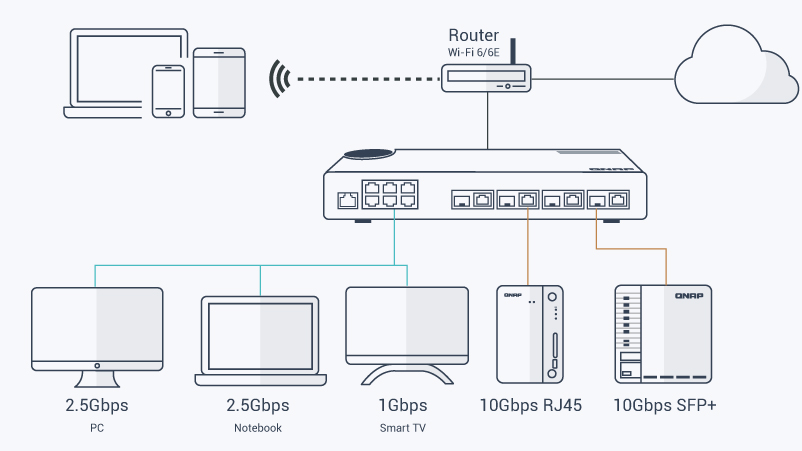
The QSW-M2106-4C provides four 10GbE SFP+/RJ45 combo ports and six 2.5 Gigabit ports for connecting various devices and enabling hybrid high-speed networks. With SFP+ interfaces, Direct Attach Copper (DAC) cables can be used for connecting directly to SFP+ devices. You can also use RJ45 ports to connect 10GBASE-T/NBASE-T devices through RJ45 Category 6 (or better) cabling. The QSW-M2106-4C is backward compatible with other Ethernet devices.
Port Compatibility

- 10GbE SFP+ ports are backward compatible with 1GbE SFP; the 10GbE RJ45 (copper) combo ports support up to five speeds (10Gb, 5Gb, 2.5Gb, 1Gb, and 100Mb); the 2.5GbE RJ45 (copper) ports support up to three speeds (2.5Gb, 1Gb, and 100Mb).
- If the distance between the switch and the device is less than 148', a Cat 6 cable can be used to achieve 10 Gb/s speeds.
Fully Embrace High-Speed Networking with QNAP
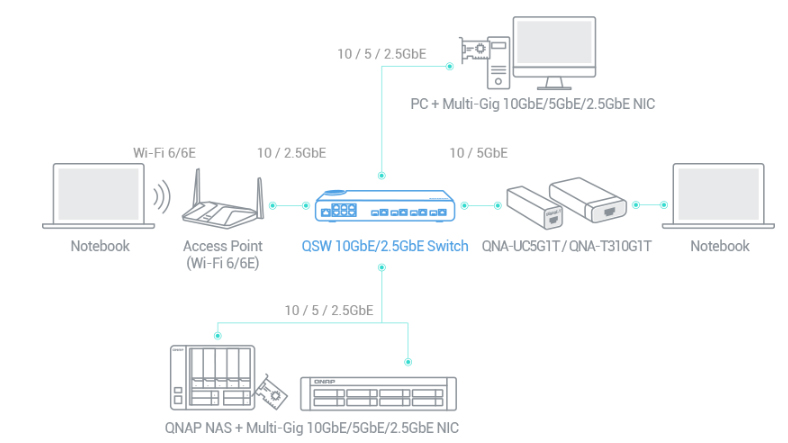
QNAP offers comprehensive, budget-friendly storage and networking solutions that provide an array of connectivity possibilities. Easily and flexibly upgrade your workplace or home network now to handle bandwidth-hungry applications.
A Switch that Supports 2.5GbE/10GbE
QNAP 2.5GbE/10GbE switches support 2.5G/10G and allow connecting multiple workstations and devices for high-speed collaboration in device-dense environments.
A Fast NAS
A QNAP NAS with multiple 2.5GbE ports and Port Trunking allows you to combine multiple ports for greater bandwidth potential.
Upgrade Desktops and Servers
Servers and desktops can accommodate QNAP PCIe network cards that support 10Gb/5Gb/2.5Gb/1Gb/100Mb Multi-Gig.
Add a 5GbE/10GbE Port to Laptops
Laptops and upgrade-limited computers can use the portable QNAP USB 3.2 Gen 1 to 5GbE adapter or QNAP Thunderbolt 3 to 10GbE adapter, allowing you to connect to 5Gb/2.5Gb/1Gb/100Mb networks.
A Switch that Supports 2.5GbE/10GbE
QNAP 2.5GbE/10GbE switches support 2.5G/10G and allow connecting multiple workstations and devices for high-speed collaboration in device-dense environments.
A Fast NAS
A QNAP NAS with multiple 2.5GbE ports and Port Trunking allows you to combine multiple ports for greater bandwidth potential.
Upgrade Desktops and Servers
Servers and desktops can accommodate QNAP PCIe network cards that support 10Gb/5Gb/2.5Gb/1Gb/100Mb Multi-Gig.
Add a 5GbE/10GbE Port to Laptops
Laptops and upgrade-limited computers can use the portable QNAP USB 3.2 Gen 1 to 5GbE adapter or QNAP Thunderbolt 3 to 10GbE adapter, allowing you to connect to 5Gb/2.5Gb/1Gb/100Mb networks.

QSS: Human-Centered Settings Guide
The QSW-M2106-4C adopts QNAP Switch System (QSS) featuring an easy-to-use Web GUI with Layer 2 management and value-added functions to simplify network set up and management.
Overview Dashboard
View real-time system information, port connection status, and port traffic.
Port Management
View port status, port packet statistics, and configure port speeds.
Settings Guide
Quickly learn how to set up the network using the introduction and step-by-step guide.
Status Chart Referencing
Refer to four major status charts during each configuration to avoid going back and forth between different settings pages.
Online Firmware Check and Update
Keep your QNAP switch secure with one-click firmware updates.
View real-time system information, port connection status, and port traffic.
Port Management
View port status, port packet statistics, and configure port speeds.
Settings Guide
Quickly learn how to set up the network using the introduction and step-by-step guide.
Status Chart Referencing
Refer to four major status charts during each configuration to avoid going back and forth between different settings pages.
Online Firmware Check and Update
Keep your QNAP switch secure with one-click firmware updates.
Optimize Network Performance with Bandwidth and Packet Control
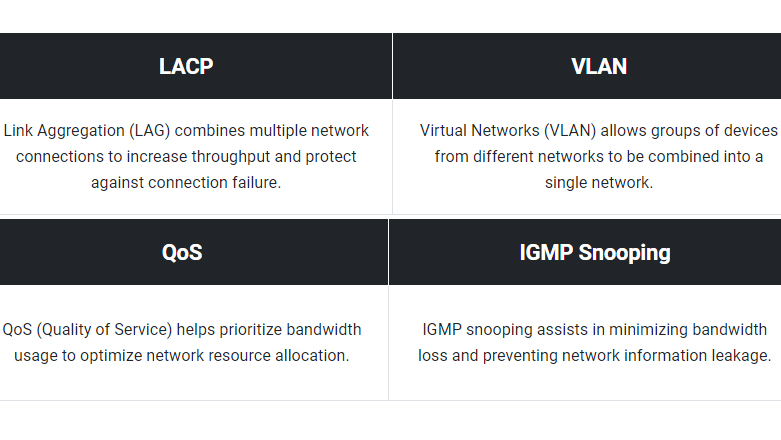
The QSW-M2106-4C provides bandwidth and packet control functions (such as LACP, VLAN, QoS, and IGMP Snooping) to boost network performance through IP grouping and bandwidth management.
Powerful Security and System Functions
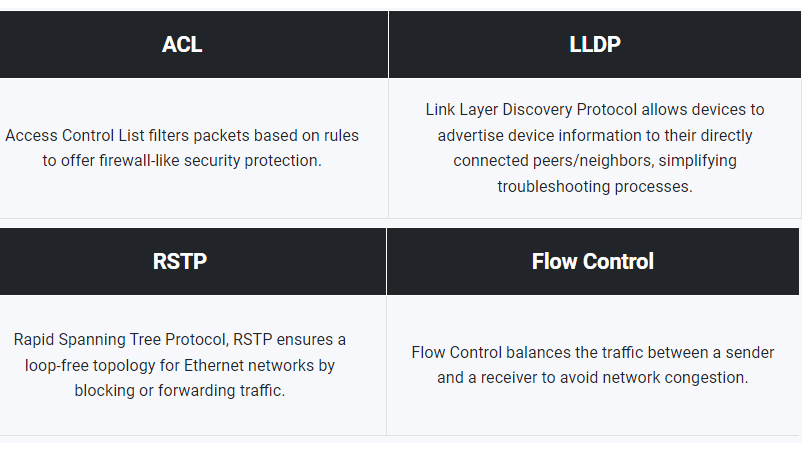
The QSW-M2106-4C has powerful security and system functions (including ACL, LLDP, RSTP, and Flow Control) to help administrators enhance network reliability using access controls, troubleshooting, loop prevention, and avoiding packet loss.
Desktop Form Factor for Easy Use in Offices
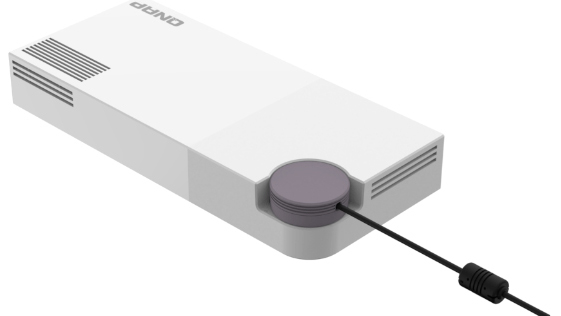
With a compact and modern design, the QSW-M2106-4C stands out with its textured surface design. The flexible DC power connector enables universal deployment of the QSW-M2106-4C and each port can be easily identified. Being fully plug-and-play, devices can be simply connected to the QSW-M2106-4C and immediately used.