

© 2026. Powered by C2 Computer. All Rights Reserved.

(NEW VENDOR) CISCO MERAKI MS120-48LP-HW MS120-48LP 1G L2 Cloud Managed 48x GigE 370W PoE Switch
Couldn't load pickup availability

(NEW VENDOR) CISCO MERAKI MS120-48LP-HW MS120-48LP 1G L2 Cloud Managed 48x GigE 370W PoE Switch
HKD 0.00
(NEW VENDOR) CISCO MERAKI MS120-48LP-HW MS120-48LP 1G L2 Cloud Managed 48x GigE 370W PoE Switch
Overview
Cisco Meraki MS120 switches provide Layer 2 access switching, ideal for branch and campus deployments. The MS120 series features a variety of power options designed to meet the diverse needs of branch and campus deployments.
With 5 different models, capable of providing up to 740W of power over a variety of port densities, including SFP capable uplinks, the MS120 line is fully ready to support future wireless infrastructure deployments across a variety of different environments.
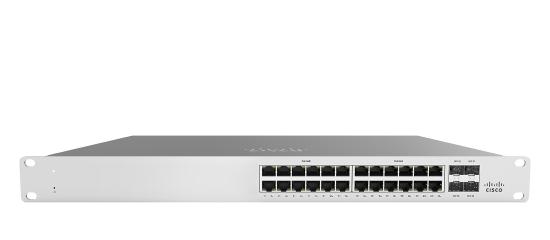
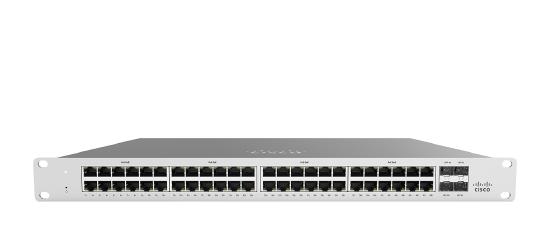
MS120-48LP-HW Specification
MS120-48LP-HW Specification |
|
|
Interfaces |
• 48 x 10/100/1000BASE-T Ethernet RJ45 with auto negotiation and crossover detection (auto-MDIX crossover) • 4 x 1GbE SFP uplink • RJ45 Management port |
|
Switching capacity |
104 Gbps |
|
Forwarding rate |
77.38 mpps |
|
Available PoE+ Power |
370 W |
|
Idle / Full Load Power |
37 / 477 W |
|
Power Supply Configuration |
Fixed internal |
|
What’s included |
1 x Rack mounting screw kit |
|
Dimensions |
1.72” x 17.32” x 13.38” (4.40 x 44 x 34cm) |
|
Weight |
12.70 lb (5.70 kg) |
|
Management |
• Managed via the Web with the Meraki cloud management platform • Integrated with Meraki Wireless and complete portfolio of IT products and solutions • Zero-touch remote provisioning (no staging needed) • Virtual Stacking supports thousands of switch ports in a single logical stack for unified management, monitoring, and configuration • Detailed historical per-port and per-client usage statistics • DHCP, client, and hostname fingerprinting • SNMPd and SYSLOG support for integration with other network management solutions • Automatic firmware upgrades with scheduling control
|
|
Layer 3 |
• DHCP Relay |
|
Remote Diagnostics |
• Email, SMS and Mobile push notification alerts • Cable testing and link failure detection with alerting • Live remote packet capture • Dynamic and interactive network discovery and topology • Combined event and configuration change logs with instant search |
|
Power |
• Power input: 100 - 240 VAC, 47-63 Hz • Power consumption: 8 - 908W |
|
Mounting |
• 1U Rack-mountable with included rack mount hardware • 2-post front mounting options available • Desktop-mountable with included feet |
|
Ethernet Switching Capabilities |
• 802.1p Quality of Service, 8 queues (w/ 6 configurable for DSCP-to-CoS mapping) • 802.1Q VLAN and trunking support for up to 4,094 VLANs • 802.1w, 802.1D Rapid Spanning Tree Protocol (RSTP, STP) • Broadcast storm control • 802.1ab Link Layer Discovery Protocol (LLDP) and Cisco Discovery Protocol (CDP) • 802.3ad Link aggregation with up to 8 ports per aggregate, Multichassis aggregates supported on stacked switches • Port mirroring • IGMP snooping for multicast filtering • MAC forwarding entries: 32K |
|
Environment |
• Operating temperature: 0°C to 45°C • Humidity: 5 to 95% non-condensing • MS120-48 feature fanless operation |
|
Regulatory |
• CSA-US (US, Canada) • FCC (USA) • IC (Canada) • CE (Europe) • RCM (Australia/New Zealand) • RoHS |
|
Security |
• Integrated two-factor authentication for Dashboard management • Role-based access control (RBAC) with granular device and configuration control • Corporate wide password policy enforcement • IEEE 802.1X RADIUS and MAB, hybrid authentication and RADIUS server testing • Multi-Domain/Multi-Host/Multi Authentication • Port security: Sticky MAC, MAC whitelisting • DHCP snooping, detection and blocking, Dynamic ARP Inspection • STP Enhancements: BPDU guard, Root guard, Loop guard • IPv4 and IPv6 ACLs |
|
MTBF Ratings |
660,538 |
Features
|
|
Configuration
The basic initial configuration of the MS120 is just as simple as any other model of MS switch. The links below provide additional information and instructions relating to each step in getting the device setup and configured for the first time.
-
Claim the device to an Organization on the Meraki Dashboard
- If a Dashboard Organization does not yet exist, Create one
-
Add the device to a Dashboard Network
- If a Network does not yet exist, Create one first
- Physically connect the device to the local network
- Connect one of the RJ45 ports to existing infrastructure to provide a temporary uplink
- Power on the device and let it check in to the Dashboard
- If necessary, configure a Static IP through the Local Status Page to allow it to communicate with the Meraki Dashboard.
- Allow the device to complete check-in and perform any initial firmware upgrades
- Finish configuring the device from the Meraki Dashboard
Context and Comparisons
| MS120-8FP | MS120-24P | MS120-48FP | |
| 1GbE RJ45 | 8 | 24 | 48 |
| 1GbE SFP | 2 | 4 | 4 |
| Dedicated Mgmt Interface | - | 1 | 1 |
| Max Switching Capacity | 20 Gbps | 56 Gbps | 104 Gbps |
| PoE/PoE+ Capable | Yes, 124W | Yes, 370W | Yes, 740W |
Technical Breakdown
Hardware Breakdown
MS120-8 Models
| MS120-8 | MS120-8LP | MS120-8FP | |
| 1GbE RJ45 |
8 |
8 | 8 |
| 1GbE SFP | 2 | 2 | 2 |
| Dedicated Mgmt Interface | - | - | - |
MS120-24/48 Models
| MS120-24 | MS120-24P | MS120-48 | MS120-48LP | MS120-48FP | |
| 1GbE RJ45 | 24 | 24 | 48 | 48 | 48 |
| 1GbE SFP | 4 | 4 | 4 | 4 | 4 |
| Dedicated Mgmt Interface | 1 | 1 | 1 | 1 | 1 |
Throughput and Capabilities
MS120-8 Models
| MS120-8 | MS120-8LP | MS120-8FP | |
| PoE/PoE+ Capable | - | Yes, 67W | Yes, 124W |
| Switching Capacity | 20 Gbps | 20 Gbps | 20 Gbps |
| Power Supply | External | External | Fixed Internal |
MS120-24/48 Models
| MS120-24 | MS120-24P | MS120-48 | MS120-48LP | MS120-48FP | |
| PoE/PoE+ Capable | - | Yes, 370W | - | Yes, 370W | Yes, 740W |
| Switching Capacity | 56 Gbps | 56 Gbps | 104 Gbps | 104 Gbps | 104 Gbps |
| Power Supply | Fixed Internal | Fixed Internal | Fixed Internal | Fixed Internal | Fixed Internal |
Physical
MS120-8 Models
| MS120-8 | MS120-8LP | MS120-8FP | |
| Mount Type | - | - | 1U Rack Mount |
| Dimensions (h x w x d) |
1.1 x 8.74 x 6 in (2.8 x 22 x 15cm) |
1.1 x 8.74 x 6 in (2.8 x 22 x 15cm) |
1.75 x 9 x 8.58 in (4.4 x 23 x 23cm) |
| Weight | 2.36 lb (1.07 kg) | 2.76 lb (1.25 kg) | 3.42 lb (1.55 kg) |
| Power Consumption | 5 - 161W | 5 - 161W | 5 - 161W |
| Power Load (idle/max) | 5 / 9 W | 7 / 88 W | 9 / 161 W |
| Operating Temperature | 32°F - 113 °F 0°C - 45°C |
32°F - 113 °F 0°C - 45°C |
32°F - 113 °F 0°C - 45°C |
| Humidity | 5% to 95% | 5% to 95% | 5% to 95% |
MS120-24/48 Models
| MS120-24 | MS120-24P | MS120-48 | MS120-48LP | MS120-48FP | |
| Mount Type | 1U Rack Mount | 1U Rack Mount | 1U Rack Mount | 1U Rack Mount | 1U Rack Mount |
| Dimensions (h x w x d) |
1.73 x 17.32 x 10 in (4.4 x 44 x 25cm) |
1.73 x 17.32 x 10 in (4.4 x 44 x 25cm) |
1.73 x 17.32 x 10 in (4.4 x 44 x 25cm) |
1.73 x 17.32 x 13.4 in (4.4 x 44 x 34cm) |
1.73 x 17.32 x 13.4 in (4.4 x 44 x 34cm) |
| Weight | 8.09 lb (3.67 kg) | 9.26 lb (4.20 kg) | 8.97 lb (4.06 kg) | 12.70 lb (5.70 kg) | 12.70 lb (5.70 kg) |
| Power Consumption | 8 - 908W | 8 - 908W | 8 - 908W | 8 - 908W | 8 - 908W |
| Power Load (idle/max) | 8 / 18 W | 28 / 425 W | 16 / 36 W | 37 / 477 W | 37 / 908 W |
| Operating Temperature | 32°F - 113 °F 0°C - 45°C |
32°F - 113 °F 0°C - 45°C |
32°F - 113 °F 0°C - 45°C |
32°F - 113 °F 0°C - 45°C |
32°F - 113 °F 0°C - 45°C |
| Humidity | 5% to 95% | 5% to 95% | 5% to 95% | 5% to 95% | 5% to 95% |
Troubleshooting
Common Troubleshooting
My device is connected to the network but not checking in to the Meraki cloud or shows a solid Orange LED.
Confirm that the device is powered on and has a valid IP address that is able to access the Internet. Use the Local Status Page to get more information about the connectivity status of the device such as if it can successfully reach the Local Gateway, Internet, and/or Meraki Cloud servers. If necessary, contact Meraki Support for additional assistance.
My Status LED is blinking WHITE
A blinking WHITE Status LED indicates that the device is in contact with the Dashboard Cloud servers and is performing a firmware update. This can sometimes take 20-45 minutes or more to complete depending on hardware and other factors.
My Status LED is blinking ORANGE
The device is not able to successfully communicate with the Dashboard Cloud servers or there may be a hardware issue with the device. Check the Local Status Page of the device to confirm the status and reach out to Meraki Support for further troubleshooting.
Event Log
The most common Event Log messages and their meaning are listed below.
Port STP change
Indicates the STP state of the port has changed, lists the relevant port number, previous, and new states. Typically accompanied by a 'Port status change' event.
Port status change
Indicates the link state of the port has changed, lists the relevant port number, old, and new state. Always accompanied by a 'Port STP change' event.
SFP module inserted/removed
Indicates that an SFP module was either inserted or removed, includes SFP module information for inserted events and always lists the relevant port number.
The Custom Tab allows you to display personalized content on your product page with full flexibility.
You can easily manage what appears inside this tab by choosing one of the following options:
- Manual Input: Enter content directly in the theme settings.
- Metafield Source: Connect the tab to a metafield to display dynamic, product-specific information.
- Page Content: Pull existing content from a Shopify page to reuse or centralize updates.
This feature is ideal for showing size guides, care instructions, brand stories, shipping details, or any custom information you want your customers to see — all without touching any code.